Eozin Python
Eozin for Python provides high-performance digital pathology image decoding, powered by a core engine implemented in pure Rust.
Installing Eozin
You can install Eozin using pip or any package manager that supports PyPI.
Quickstart
The API is basically similar to OpenSlide-python.
from eozin import Eozin
from PIL import Image

# Load a slide image
slide = Eozin("/some/slide.svs")

# Get dimensions of the slide at level 0 (full resolution)
slide_width, slide_height = slide.dimensions

# Get the index of the lowest resolution level
lowest_resolution_level = slide.level_count - 1

# level_tile_ranges returns a list of tuples:
# [(horizontal_tiles, vertical_tiles), ...]
lowres_tile_ranges = slide.level_tile_ranges[lowest_resolution_level]

# Retrieve the tile at the center of the level
# lowres_tile_ranges[0] is the width in tiles, and [1] is the height in tiles.
lowres_centered_tile: Image.Image = slide.read_tile(
  lowest_resolution_level,
  lowres_tile_ranges[0] // 2,
  lowres_tile_ranges[1] // 2,
)
lowres_centered_tile.show()

# Extract a specific region (OpenSlide-like API)
# read_region(location, level, size)
region: Image.Image = slide.read_region((0, 0), 0, (1024, 1024))
For more details, please refer to the API reference.
Concept of this library
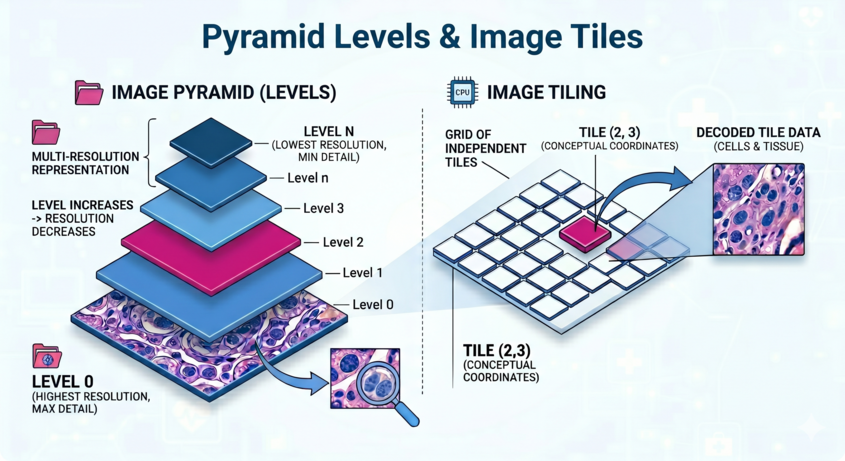
Digital pathology images are very large, sometimes exceeding 100,000 pixels. Since loading the entire image in standard formats is impractical, they are designed as containers consisting of small rectangular images called "tiles".
Furthermore, since downscaling these images on the fly is computationally expensive, they typically store multiple lower-resolution versions, referred to as levels. Vendors have developed various proprietary formats, and libraries like OpenSlide and bioformats have been instrumental in handling them.
Eozin is designed to provide lightweight, low-latency access to these tiles. Specifically, each tile is stored as a fragmented byte sequence; Eozin calculates the byte offset based on the requested level and coordinates, then appends the necessary headers so the buffer can be interpreted as a standard image format.
Decoding each tile is handled by Pillow. This minimizes overhead and enables
fast tile access. The read_tile method simply retrieves the actual image tile,
making it suitable for applications such as creating GUI drawing applications
or performing image recognition by scanning tiles one by one.
The read_region method is almost equivalent to the
OpenSlide Python API
and allows you to extract any range. Unlike OpenSlide, it does not maintain
an internal cache, so if you repeatedly access the same region,
please consider caching on your end.
Note
Vendor and file format names mentioned in this library are the property of their respective owners. This library is not certified for clinical use.